
HTML & CSS Web Design Basics: Start Your First Website Today
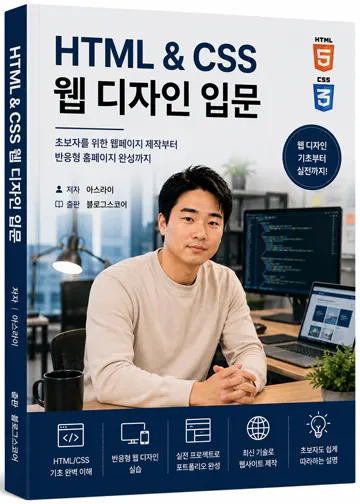
What Can You Create by Learning HTML & CSS?
The internet is full of websites.
From online stores and company homepages to blogs, communities, and news sites—everything is built using web technologies.
Among these, the most fundamental skills are HTML and CSS.
HTML structures a webpage's content, while CSS enhances its visual design.
Mastering just these two basics allows you to create your own website. It also provides an excellent foundation for learning more advanced web technologies like JavaScript or PHP later on.
This course is designed for complete beginners with clear explanations that make coding accessible to everyone.
Who Should Take This Course?
Complete beginners in programming
Anyone wanting to build their own website
Those seeking a structured approach to learning HTML & CSS
Students and professionals aiming to become web developers
Individuals wanting to create a personal portfolio site
Anyone looking to solidify their foundation before moving on to JavaScript or PHP
No prior coding experience is required.
If you can use a computer and navigate the internet, you're ready to start.
What You'll Learn in This Course
This course isn't just about memorizing tags—it's hands-on learning as you build real websites.
You'll cover these key topics:
Understanding HTML document structure
Using headings, paragraphs, images, and links
Creating tables and input forms
Writing proper document structure with semantic tags
Applying CSS styles using selectors
Customizing fonts, colors, and backgrounds
Mastering the Box Model concept
Building layouts with Flexbox
Creating responsive websites
Designing real-world UI elements like buttons, cards, and menus
Developing business landing pages
Completing a personal portfolio website
Deploying and managing your site online
We'll start with simple examples but end up building a fully functional website from scratch.
Why Learn HTML & CSS First?
Web development involves many languages like JavaScript, PHP, Python, and Node.js—but all of these rely on HTML at their core.
You can't display content without HTML, and you can't create a visually appealing design without CSS.
That's why most web developers learn HTML and CSS first before moving to JavaScript or other advanced technologies.
A strong foundation makes learning subsequent skills much faster and easier.
Projects You'll Build Along the Way
You'll practice by building real projects as you follow along.
Here are some examples you'll create:
Personal introduction page
Login screen
Registration form
Card-style UI components
Navigation menus
Responsive layouts
Business landing pages
Personal portfolio websites
The fastest way to build skills is by creating things yourself.
Real-World Techniques You'll Use
This course focuses on practical, industry-standard approaches—not just simple examples.
We use HTML5 and CSS3 syntax that's widely used in professional settings today. Code is written using techniques you'd find in real business environments from the start.
Learning good habits early will make it easier to learn JavaScript or frameworks later on.
Best Way to Study
HTML and CSS are best learned by writing code, not just reading about them.
Follow along with the course, type out the code yourself, and experiment with small changes.
Try changing colors, fonts, or layout structures—you'll naturally understand how things work as you make these adjustments.
It's okay to make mistakes at first. In fact, fixing errors is one of the most effective ways to learn.
Your Learning Path Forward
After completing this course, you'll be ready for more advanced web development topics:
HTML & CSS
JavaScript
PHP
MySQL
Python
Flask
Node.js
Following this sequence will help you build and operate complete websites on your own.
Course Outline
Lecture | Content |
|---|---|
1st Lecture | What are HTML & CSS? How web pages work |
2nd Lecture | Setting up your development environment (VS Code, Live Server, Chrome) |
3rd Lecture | HTML structure and document creation |
4th Lecture | Learning heading, paragraph, list, link, and image tags |
5th Lecture | Creating tables (Table) and forms (Form) |
6th Lecture | Understanding semantic tags (header, nav, main, section, footer) |
7th Lecture | What is CSS? Learning selectors and styling techniques |
8th Lecture | Customizing fonts (Font), colors (Color), and backgrounds (Background) |
9th Lecture | Mastery of the Box Model (margins, padding, borders) |
10th Lecture | Building layouts with Flexbox |
11th Lecture | Responsive web design and media queries (Media Query) |
12th Lecture | Creating common UI elements like buttons, cards, and menus |
13th Lecture | Business landing page practice |
14th Lecture | Building a personal portfolio website |
15th Lecture | Deploying your site (GitHub Pages or web hosting) and professional tips (Final) |
In Conclusion
Web development isn't as hard as it seems.
At first, the unfamiliar tags and properties might feel overwhelming—but by following along step-by-step, you'll soon find yourself building your own webpages without even realizing it.
This course focuses on learning by creating, not just memorizing syntax.
By completing each lesson carefully, you'll finish with a fully responsive website and portfolio ready to showcase your skills.
Let's start this journey together. Ready to begin building your first website?
FAQ
Do I need prior coding experience?
No. This course is designed for complete beginners who have never coded before.
What will I be able to build after this course?
You'll create a fully functional responsive website, business landing page, and personal portfolio site.
Korean Source
This article is an English localization of a Korean-language report from BlogScore. Original: [Html/CSS 강좌] HTML & CSS 웹 디자인 입문 프롤로그 - 웹 개발의 첫걸음을 함께 시작합니다