
How to Get Your Blog Posts Indexed by Google Faster: A Complete Guide from Sitemap to Indexing Requests


How to Get Your Blog Posts Indexed by Google Faster: A Complete Guide from Sitemap to Indexing Requests
So far, we've learned about SEO writing and image optimization.
But even if you write great content, your posts won't appear in search results unless Google knows they exist.
This is why indexing is crucial.
In this guide, we'll walk through the process of helping Google discover your site and display your content in search results.
What Is Indexing?
Indexing is the process where Google adds your content to its database.
To put it simply,
If you published a book, indexing would be like adding it to a library's catalog.
A book not listed in the catalog can't be found by anyone.
The same applies to websites.
Without indexing, your content won't appear in search results.
What Is Google Search Console?
Google Search Console is a free tool provided by Google for website management.
You can use it to:
Add your site
Check search performance
Monitor indexing status
Submit sitemaps
Identify errors
It's an essential tool for anyone doing SEO.
What Is a Sitemap?
A sitemap is a file that tells Google about all the posts on your site.
For example, it lists:
Home
Courses
Posts
Categories
This helps Google discover new content more easily.
What Is robots.txt?
robots.txt is a file that tells search engines:
"Which parts of your site can be crawled, and which should be excluded."
For example, you might exclude admin pages but allow posts to be indexed.
Misconfiguring this file can prevent indexing, so it's important to set it up correctly.
Adding Your Site to Google Search Console
This is the first step you should take.
The process is straightforward:
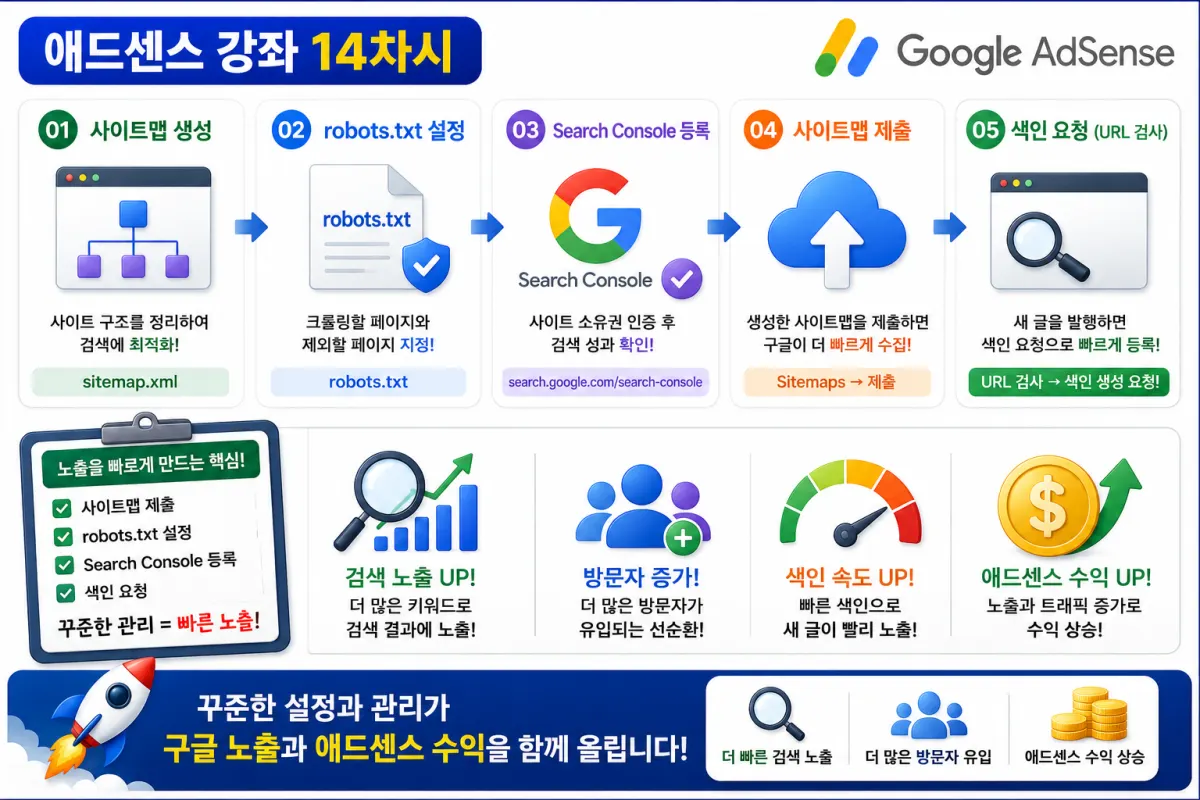
Visit Google Search Console
Add your site
Verify ownership
Submit your sitemap
Complete the setup
Once set up, it will manage itself automatically.
Submitting Your Sitemap
After adding your site, submit your sitemap.
For example:
https://yourdomain/sitemap.xml
Enter your sitemap URL to help Google understand your site structure.
Submitting a sitemap doesn't guarantee immediate indexing, but it significantly helps search engines discover your content faster.
What To Do When You Publish New Content
After publishing new posts, you can check their status in Search Console.
If they haven't been indexed yet, you can send an indexing request.
This tells Google: "This new content has been published."
How Long Does It Take to Appear in Search Results?
There's no set timeline.
Some posts appear within hours, while others may take days or weeks.
The speed depends on your site's trustworthiness and how long it has been active.
The key is consistently publishing high-quality content.
Why Indexing Might Be Delayed
Your posts might take longer to index if:
Your site is newly created
The quality of your content is low
You have duplicate content
robots.txt is misconfigured
Sitemap errors exist
Server issues are present
Check these factors first to improve indexing speed.
What You Can Monitor in Search Console
Search Console provides valuable insights, such as:
Search clicks
Impressions (how often your site appears)
Average ranking position
Indexing status
Mobile issues
Page experience metrics
You can use this data to continuously improve your SEO strategy.
Consistent Site Management Speeds Up Indexing
The longer you operate a site and the more consistently you publish quality content, the more often Google will visit your site.
This increases the likelihood that new posts will be discovered faster.
In short, consistent management is the best SEO strategy.
Common Mistakes Beginners Make
New users often make these mistakes:
Failing to register with Search Console
Not submitting a sitemap
Misconfiguring robots.txt
Publishing content without taking further action
Continuously editing before being indexed
These mistakes can delay your search visibility.
Search Visibility Checklist for New Posts
After publishing new content, check these items:
Search Console registered
Sitemap submitted
robots.txt configured correctly
Content published
Indexing request sent
Mobile-friendly display confirmed
No page errors detected
Following this checklist ensures most of your search visibility setup is complete.
Search Visibility Takes Time, Not Instant Results
Many people get discouraged when their posts don't appear immediately after publishing.
But SEO is a long-term strategy.
The more you consistently publish quality content and use Search Console effectively, the more search visibility opportunities will grow over time.
Search engines prioritize sites that consistently provide high-quality content over fast-loading sites alone.
Conclusion
SEO isn't just about writing content—it's also about making sure Google can find and understand your content through sitemaps, Search Console, and indexing requests.
If you make these steps a habit, new posts will have a better chance of being indexed more quickly by search engines.
In our next guide, we'll cover internal linking strategies for higher rankings, which can increase user engagement time and boost SEO performance through effective content connections.
FAQ
How long does it take for Google to index new content?
There's no fixed timeline; some posts appear within hours, others may take days or weeks depending on site trust and activity.
What is the most common mistake beginners make with SEO?
Failing to register with Google Search Console and submit a sitemap are the top mistakes that delay indexing.
Korean Source
This article is an English localization of a Korean-language report from BlogScore. Original: [14차시-실전편] 내 글을 구글에 빨리 노출시키는 방법! 사이트맵부터 색인 요청까지 완벽 가이드