
Connecting Claude Code to MCP: Completing Your AI Development Environment
AI Development Environment Project: Episode 8
Connecting Claude Code to MCP: Your AI Development Environment is Complete
Last time, we covered installing Claude Code and analyzing actual projects.
Now, Claude can read project files, understand their structure, and modify code.
However, there's still a missing piece.
Claude currently only understands information within the project folder.
It doesn't connect to databases, operating systems, or external services yet.
This is where MCP (Model Context Protocol) comes in.
What is MCP?
MCP stands for
Model Context Protocol
a standard interface that connects various tools to Claude.
In simple terms, it's like giving Claude access to a computer, files, databases, Git, and browsers—tools it couldn't use before.
Why MCP is Needed
For example, if you ask Claude,
Show me the user information.it can't answer because it doesn't have access to the database.
But with a connected MySQL MCP, Claude can query the actual database and retrieve the needed information.
This means AI will better understand your project context.
What MCP Enables
With MCP connected, Claude can perform tasks like:
Searching project files
Querying MySQL databases
Checking Git information
Analyzing logs
Automating browsers
Calling APIs
This significantly expands the scope of your AI development environment.
MCPs Used in This Project
In this series, we'll use these MCPs:
Filesystem MCP

↓

MySQL MCP

↓

Git MCP

↓

Playwright MCP

↓

Custom MCP
We'll connect them one by one to complete your AI development environment.
Installing Filesystem MCP
First, install the Filesystem MCP.
Run this command in the terminal:
sudo npm install -g @modelcontextprotocol/server-filesystemOnce installed, Claude Code is ready to use it.
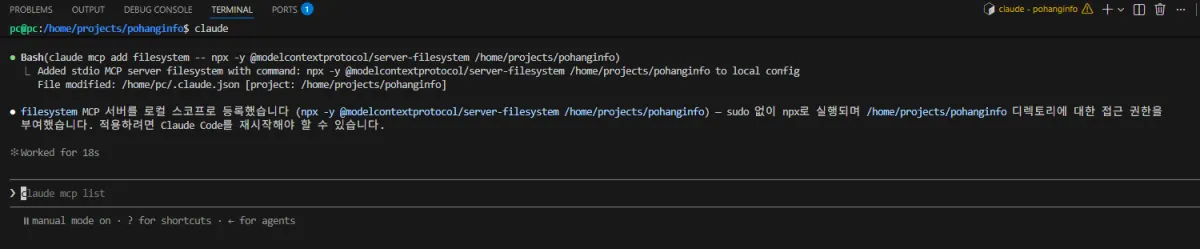
Registering MCP in Claude Code
In Claude Code,
run this command:
claude mcp add filesystemOr register it through your project's configuration file.
After registration, Claude can read not just the project folder but also specified external folders.
Verifying MCP Connection
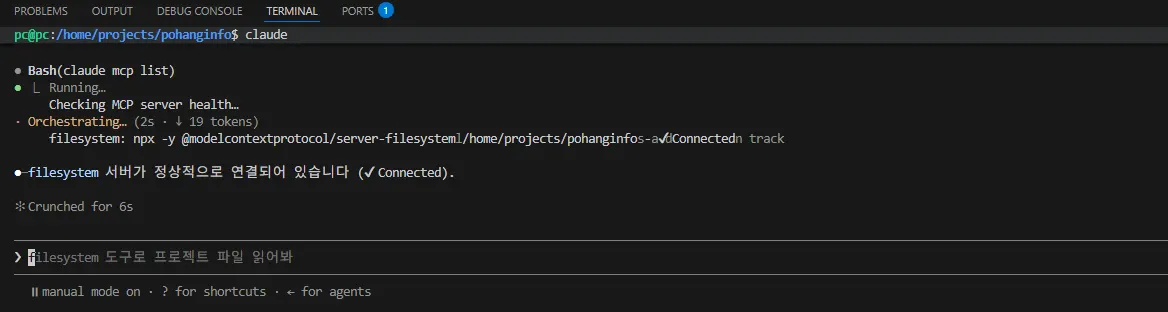
Check registered MCPs:
claude mcp listIf connected properly, Filesystem MCP should appear.
First Test
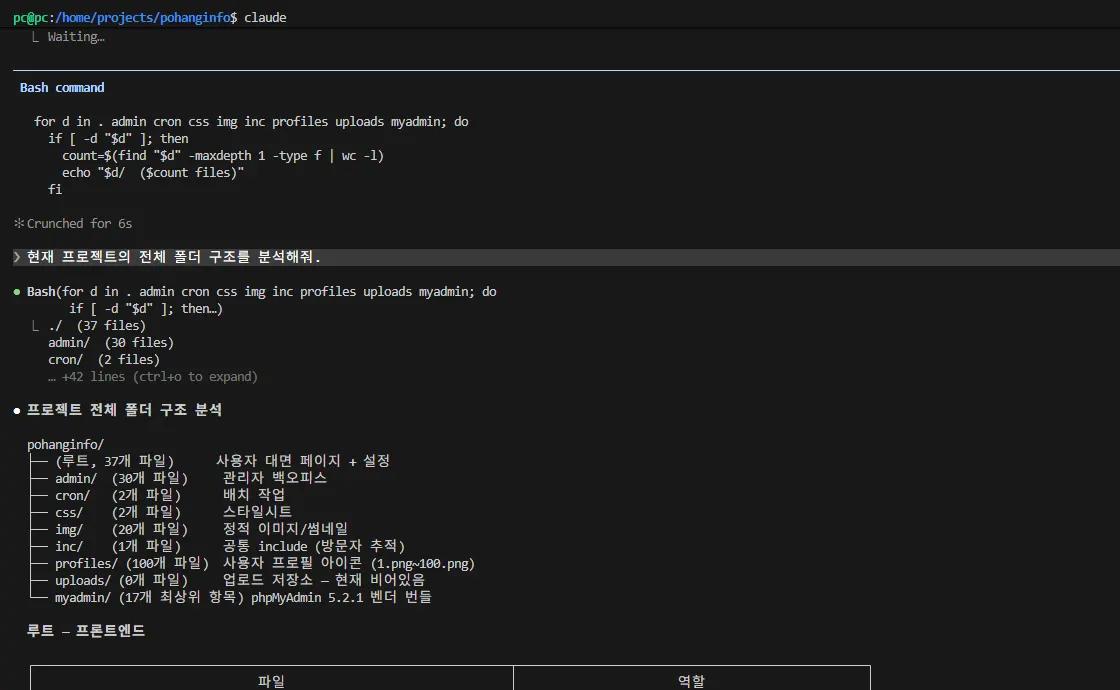
Ask Claude:
Analyze the full folder structure of the current project.Or,
Explain the roles of the admin and cron folders.With Filesystem MCP connected, Claude can analyze your project more accurately.
Important Considerations When Using MCP
MCP is a powerful tool,
but granting all permissions isn't advisable.
It's better to grant only the necessary permissions for your project.
This approach also enhances security.
What Your AI Development Environment Looks Like Now
Your environment now follows this structure:
VS Code

↓

Claude Code

↓

Filesystem MCP

↓

Git

↓

Project Analysis
In the next episode, we'll connect MySQL to let Claude query actual databases.
How MCP Changes Everything
Before MCP, Claude could only analyze project files.
After connecting MCP, your AI development environment understands not just the code but also databases, file systems, Git, and browsers.
This is when the true potential of AI in development becomes clear.
Summary of This Lesson
In this episode, we learned what MCP (Model Context Protocol) is and connected Filesystem MCP to Claude Code.
Claude can now better understand your project and use various tools effectively.
Next time, we'll connect MySQL MCP so Claude can directly query databases in your development environment.
Next Episode Preview
AI Development Environment Project: Episode 9
Connecting MySQL MCP and Showing Databases to Claude
Topics Covered
Installing MySQL MCP
Connecting to Claude Code
Querying MySQL databases
Executing SQL
Analyzing project databases
Completing your AI development environment
FAQ
What is MCP?
MCP (Model Context Protocol) is a standard interface that connects various tools like databases, file systems, and browsers to AI models such as Claude Code.
Why connect Filesystem MCP?
Filesystem MCP allows Claude Code to access external folders beyond the project directory, enabling more comprehensive code analysis and development support.
Korean Source
This article is an English localization of a Korean-language report from BlogScore. Original: [AI 개발환경 구축 프로젝트] 8강 Claude Code에 MCP 연결하기, AI 개발 환경이 완성됩니다