
Building a Profile Edit Feature | Coding Tutorial
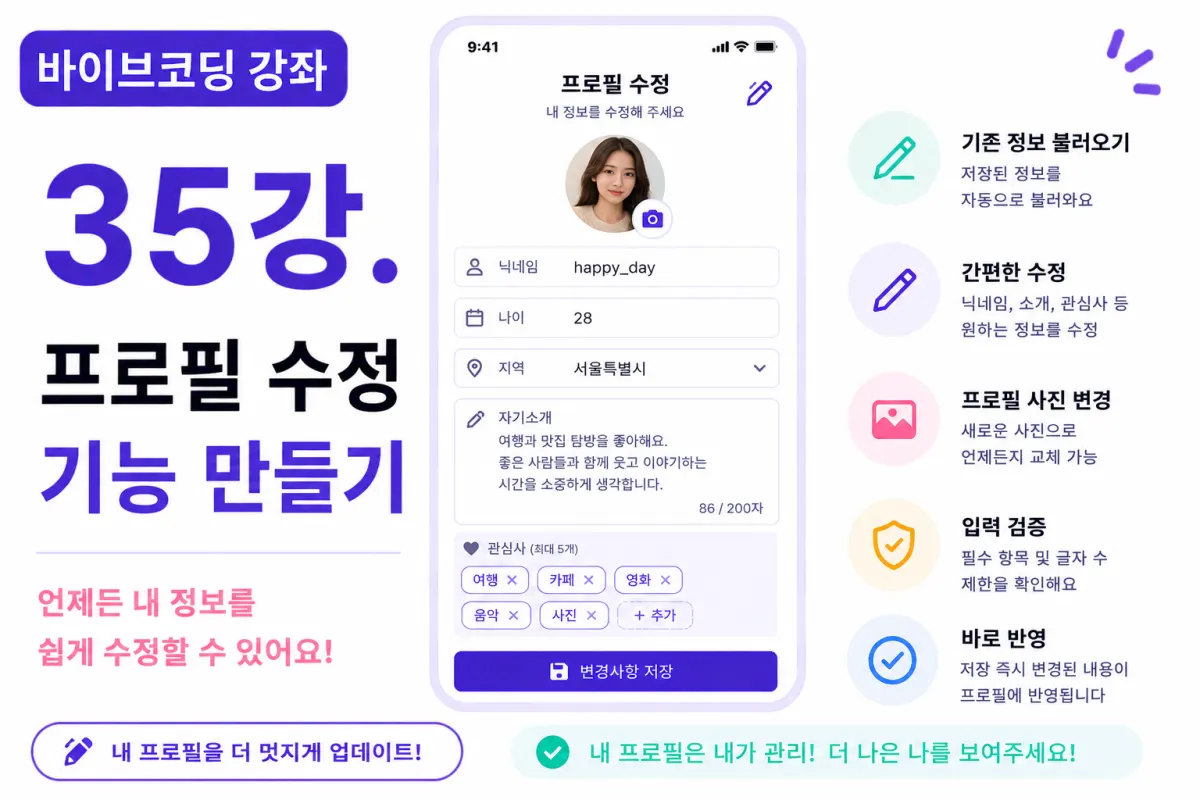
What You'll Learn in This Lesson
Last week, we implemented the interest selection feature.
Now users can input:
Profile photo
Nickname
About me
Interests
However, without the ability to edit saved information, this would be inconvenient.
In this lesson, we'll implement a profile editing feature.
We'll cover these topics:
Loading existing data
Setting up the edit screen
Saving changes
Immediate UI reflection
Error handling
After this lesson, users will be able to modify their profiles anytime.
Why Profile Editing is Necessary
People's interests can change over time.
They might want to update their profile photo,
or rewrite their 'about me' section.
Therefore, profiles should always be editable.
This feature is standard across most services.
Setting Up the Edit Screen
In this project, we'll reuse the profile registration screen as-is.
The only difference: instead of empty fields,
the screen will display previously saved information.
This way, users only need to modify what's necessary.
Requesting Help from Cursor AI
First, we'll ask Cursor AI for assistance with the following request:
Generate a screen that allows users to edit their profile information.

Fetch the currently logged-in user's profile from Supabase Database,
and display existing data in input fields automatically.
The AI will generate both the database query and UI code.
Loading Existing Data
When the screen opens,
we'll fetch the currently logged-in user's information:
Profile photo
Nickname
Age
Gender
Location
About me
Interests
Once retrieved, the fields will be pre-filled automatically.
Editable Fields
This project will allow editing of these items:
Profile photo
Nickname
Age
Location
About me
Interests
Email is excluded as it's part of login information.
Detecting Changes
If no changes are made, the save button will remain disabled.
Only enabling the save button when actual changes occur helps prevent unnecessary data saves.
The Save Button
When users click 'Save', only modified fields will be updated in Supabase Database.
After successful saving,
a confirmation message appears:
Profile successfully updated.
This ensures users know their changes were saved.
Immediate UI Reflection
After editing a profile,
changes should appear immediately without requiring page refreshes.
For example, changing your nickname updates both the header and profile screen instantly.
This real-time update significantly improves user experience.
Input Validation
The same validation rules used during registration apply here:
Nickname left empty
About me exceeds 200 characters
More than five interests selected
These cases won't be saved, maintaining consistent validation standards.
Changing Profile Photos
Users can replace their current photo with a new one.
After uploading a new image,
the system either deletes the old image or replaces it with the new URL.
Maintaining clean storage is important for performance.
Editing 'About Me'
The textarea will display existing content.
Users can modify specific sentences or rewrite entirely.
The character count feature remains active.
Updating Interests
Previously selected interests appear pre-checked.
New interests can be added, and existing ones removed.
The five-interest maximum limit remains unchanged.
Refactoring with Cursor AI
After completing the feature,
we'll ask AI to improve it with:
Improve the profile editing feature for better efficiency.
The AI will suggest:
Removing duplicate code
Separating common functions
Performance improvements
Loading State During Save
When the save button is clicked,
it becomes disabled to prevent multiple clicks.
Displaying 'Saving...' provides clear feedback on progress:
Saving...
Testing the Feature
Test in this order:
Change nickname
Edit about me section
Update interests
Change profile photo
Click save
Refresh and verify data
If all changes appear correctly after refresh, the feature is complete.
GitHub Commit Message
After completion,
ask Cursor AI to create a commit message:
Create a commit message for profile editing implementation.
Committing features individually helps with project management.
Additional Features in Production
In real services, you'd also see:
Edit history tracking
Data backup before changes
Nickname change limits
Profile approval systems
This project implements only the basic editing functionality.
Profile System Complete
After this lesson,
users can modify their profiles anytime.
The profile feature now matches real service standards more closely.
Next Lesson Preview
In the next lesson, we'll create a detailed profile view.
You'll learn to display other users' information in card format,
showing photos, about me sections, and interests,
laying the groundwork for matching systems later on.
Conclusion
This lesson implemented profile editing functionality.
We covered retrieving existing data, making edits, saving changes, and immediate UI reflection,
completing the full profile management feature.
In the next lesson, we'll build a detailed profile view to let users see other people's information like in real dating apps.
FAQ
Why is profile editing important?
Users need to update their information over time as interests change or they want a new photo, making the feature essential for user experience.
Can email be edited in this feature?
No, email is part of login credentials and remains unchanged in this implementation.
Korean Source
This article is an English localization of a Korean-language report from BlogScore. Original: [바이브코딩 강좌] 35강. 프로필 수정 기능 만들기