
Building a Interest Selection Feature in Your Dating App
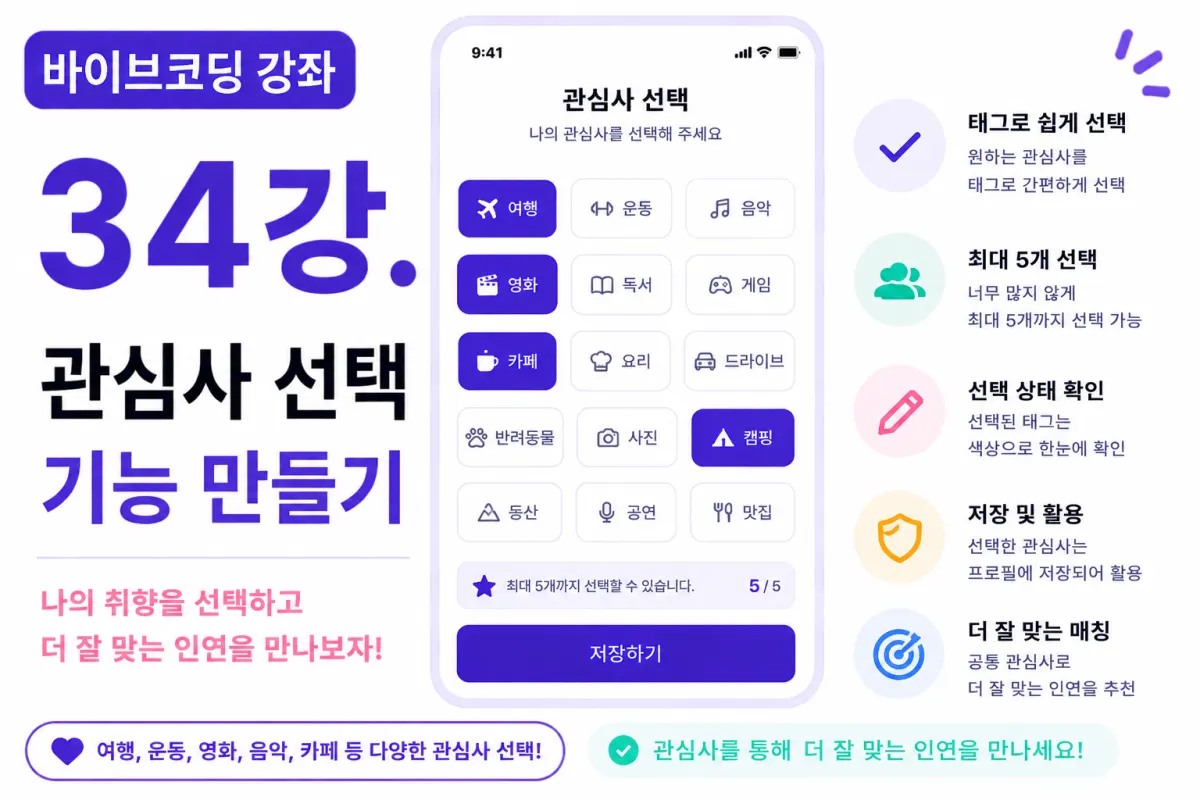
What You'll Learn in This Lesson
Last week, we implemented the self-introduction writing feature.
Now users can register:
Profile photo
Nickname
Self-introduction
However, there's still a lack of information to express user preferences.
In this lesson, we'll implement the interest selection feature.
We'll cover these topics together:
Designing interest data structure
Creating tag UI
Multiselect functionality
Selecting limited number of interests
Preparation for storing in Supabase
By the end of this lesson, profiles will become more complete.
Why Interests Are Important
In dating apps, shared interests are crucial.
For example:
If both users enjoy traveling,
or watching movies,
or exercising,
it becomes much easier to start conversations.
Interests aren't just simple information—they're key data that improve matching quality.
Which Interests Will We Offer?
In this project, we'll prepare the following interests:
Travel
Movies
Music
Sports
Reading
Gaming
Cooking
Cafes
Driving
Pets
Photography
Camping
Hiking
Performances
Famous Restaurants
We'll start with about 15 interests,
and can add more as the service operates.
Requesting Help from Cursor AI
First, we ask Cursor AI to:
Using Next.js and Tailwind CSS, create a screen where users can select interests as tags.

Implement it so users can choose up to 5 interests.
The AI generates a UI with tag buttons.
Creating Tag (UI) for Interests
We'll implement interests as selectable tags, like buttons.
For example:
🏕 Camping

🎬 Movies

🎵 Music

☕ Cafes
This makes it easy to scan at a glance.
Selected tags will change color for clear distinction.
Multiselect Functionality
Interests should allow selecting multiple options,
not just one.
When users click a tag, the selection state toggles.
Clicking again unselects it.
This toggle approach is intuitive and user-friendly.
Limited Number of Selections
Selecting too many interests can dilute profile meaning.
In this project, we'll limit to a maximum of 5 interests.
If users try to select the 6th tag,
a notification message will appear.
Displaying Selection Status
Selected tags should be visually distinct:
Default: White background
Selected: Purple background
This design helps users quickly see their current selections.
Interest Data Structure
In Supabase, interests can be stored as an array:
["Travel", "Movies", "Cafes"]
Storing them this way makes it easier to use later for search or recommendation features.
Enabling the Save Button
The save button should only activate when at least one interest is selected.
When nothing is selected, the save button remains disabled,
encouraging users to provide minimum required information.
Displaying Interests on Profile
Interests will also be displayed as tags on the profile screen.
For example:
🏕 Camping
🎵 Music
☕ Cafes
This simple display helps others quickly understand preferences.
Improving with Cursor AI
After completing the feature,
ask Cursor AI to:
Improve the interest tag design to make it look better.
The AI may suggest:
Adjusting spacing
Changing colors
Add animations
for various improvements.
Preparing for Search Features
Interests aren't just for display—they'll be important conditions for future search,
recommendation, and matching algorithms.
Properly designing this now will make adding these features later easier.
Mobile Usability
On mobile devices,
tags shouldn't be too small for easy selection.
Make sure there's enough spacing between buttons,
and adjust sizes so fingers can tap easily.
Always consider mobile user experience.
Testing
Verify these points:
Selecting tags
Deselecting tags
Maximum 5 selection limit
Save button activation
If all functions work properly,
the interest selection feature is complete.
GitHub Commit
After completing the feature,
ask Cursor AI to:
Create a commit message suitable for implementing the interest selection feature.
This helps maintain consistent project history—a good habit.
Additional Features in Real Services
In actual services,
you'd also offer:
Interest search
Add custom interests
Popular interest recommendations
AI-based interest suggestions
This project focuses on implementing the basic tag selection feature.
Your Profile Is Almost Complete
By the end of this lesson,
users will be able to register:
Photo
Self-introduction
Interests
Your profile is now close to real service standards.
Next Lesson Preview
In the next lesson, we'll implement the profile editing feature.
Users will be able to edit their profiles anytime,
and save changes to the Supabase database.
Closing Remarks
We've implemented the interest selection feature in this lesson.
With completed tag UI, multiselect functionality, selection limits, and data structure design,
we've made the profile system more polished.
In the next lesson, we'll build the profile editing feature to let users keep their information up-to-date whenever needed.
FAQ
Why limit to 5 interests?
Limiting to 5 prevents profiles from becoming too cluttered while still allowing meaningful expression of user preferences.
How are interests stored in Supabase?
Interests are stored as an array, such as ["Travel", "Movies", "Cafes"], making it easy for future search and recommendation features.
Korean Source
This article is an English localization of a Korean-language report from BlogScore. Original: [바이브코딩 강좌] 34강. 관심사 선택 기능 만들기