
Building an Admin Dashboard for Your Web App | Vibecoding Lesson 53
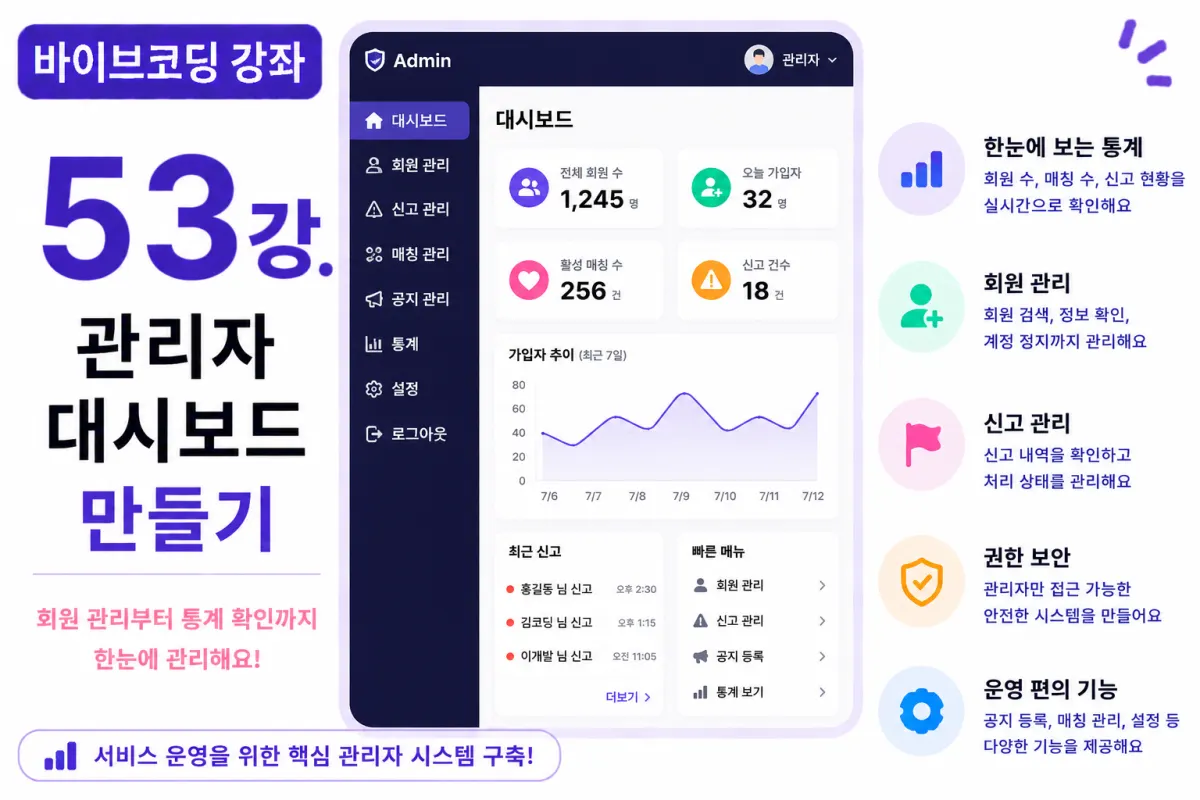
What You'll Learn in This Lesson
In the previous lesson, we implemented report (Report) and block (Block) features.
Now your service has a solid foundation for safe operation.
This lesson will guide you through building an Admin Dashboard that real operators use daily.
You'll learn these key components:
Admin login system
Statistics dashboard
User management
Report handling
Operational menus
Permission management
By the end of this lesson, you'll have a complete admin system ready for real service operation.
Why Do You Need an Admin Page?
As your user base grows, operators need to manage more tasks directly.
For example:
User management
Report processing
Announcement posting
Service statistics review
These tasks can't be handled on regular user interfaces.
An admin-only interface is essential for smooth operations.
Admin Permission Levels
Not all users should access the admin page.
We'll add a role column to the Profiles table:
role
With common roles like:
user
admin
The system will check permissions during login to restrict access to admins only.
Requesting Help from Cursor AI
First, ask Cursor AI for help with this request:
Build an Admin Dashboard using Next.js and Supabase.

Ensure only admins can access it by checking permissions,
and display key statistics: total users, reports received, and matches made.
The AI will generate both permission checks and the dashboard layout.
Dashboard First Screen
The admin's first screen shows key metrics in card format:
Total users
New sign-ups today
Active matches
Reported incidents
This gives operators an immediate overview of service status.
User Management
The user management screen displays:
Profile photo
Nickname
Email address
Join date
Account status
We'll also add search and sorting features for efficient management.
User Suspension Feature
Problematic users should be suspended by admins:
Active

Suspended

Deleted
Suspended accounts can't log in.
Report Management
The report screen shows received reports in table format:
Reporter
Reported user
Reason for report
Report time
Status
Operators can review and record resolution status.
Search Functionality
As your user base grows, search becomes essential:
You'll implement searches by nickname, email, or user ID.
This dramatically improves operational efficiency.
Statistical Charts
We'll use Chart.js to display these visualizations:
Daily sign-ups
Monthly matches
Trend of reports
Active users
Charts provide more intuitive insights than raw numbers.
Improving with Cursor AI
After completing features, ask Cursor AI:
Make the admin dashboard look better.
The AI will suggest improvements to:
Card design
Chart layout
Responsive layout
Security Considerations
Admin APIs must also verify permissions.
Hiding features on the frontend isn't enough.
Combine Supabase Row Level Security (RLS) with server-side validation for maximum security.
Performance Optimization
With large user bases, we won't load all data at once.
We'll use pagination and search filters to fetch only necessary data.
Testing the System
Test in this order:
Admin login
Dashboard access check
View user list
Review reports
Suspend a test account
Check statistics charts
If all steps work properly, your admin system is complete.
GitHub Commit Messages
After completing features, ask Cursor AI:
Create a commit message for the admin dashboard implementation.
Maintain good practice by committing feature-specific changes regularly.
Additional Features in Real Projects
In production services, you'd also implement:
Admin activity logs
Separate admin permissions
Announcement management
Event management
Two-factor authentication for admins
This project focuses on building the core admin dashboard.
Your Service Is Now Ready to Operate
With this lesson complete, you can directly manage members and reports with a fully functional system.
You've established a solid foundation for stable post-launch operation.
Next Lesson Preview
The next lesson will implement admin announcements feature.
We'll create functionality to add announcements and deliver important news to users.
Conclusion
This lesson implemented the Admin Dashboard with user management, report handling, statistics, and permission controls - essential features for real service operations.
In the next lesson, we'll enhance this system further by adding announcement management capabilities.
FAQ
Why is an admin dashboard important for my service?
An admin dashboard provides essential tools for managing users, reports, and analytics in one place, allowing efficient operation as your user base grows.
How do I secure the admin area from unauthorized access?
Implement role-based permissions (user/admin), verify on both frontend and backend, and use Supabase Row Level Security (RLS) for maximum protection.
Korean Source
This article is an English localization of a Korean-language report from BlogScore. Original: [바이브코딩 강좌] 53강. 관리자(Admin) 대시보드 만들기