
Building an AI Development Environment: Analyzing Projects with Filesystem MCP
AI Development Environment Project: Lecture 9
Analyzing Projects with Filesystem MCP and Properly Utilizing AI
Last time, we connected Claude Code to the Filesystem MCP.
Now, Claude can understand a project as a whole rather than just reading individual files, creating a more accurate environment for analysis.
In this session, we'll explore how to effectively use Claude Code when analyzing an actual project.
This example uses the PohangInfo Project, which is currently in operation as our reference point.
What Changes When Connecting Filesystem MCP?
Before using MCP, Claude could only analyze limited aspects of the current open file or project structure.
With Filesystem MCP connected, Claude can explore the entire project and find related files to provide more accurate answers.
For example
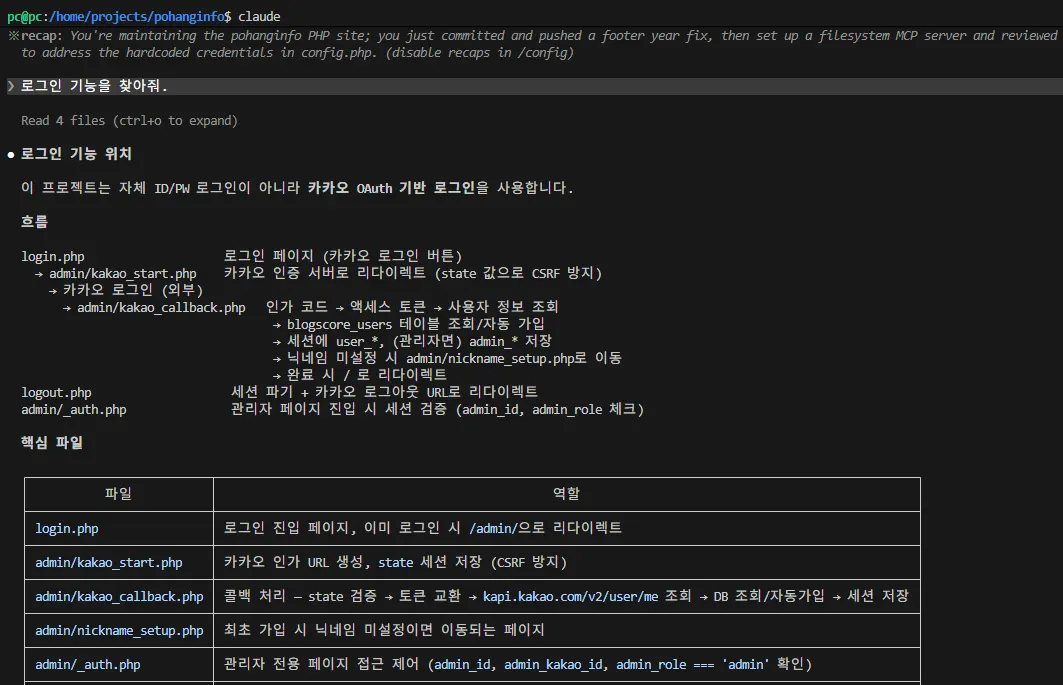
Find the login functionality.When entering this, Claude searches for relevant files and explains the actual login flow.
Analyzing Project Structure
First, let's ask Claude:
Analyze the project structure.Claude will automatically explain the folder structure, main features, and key files as it analyzes the project.
This is one of the most commonly used questions when first analyzing a real project.
Locating Admin Pages
Now let's find admin-related functionality.
Find files related to the admin page.Claude analyzes and explains relevant files, such as:
admin folder
Login processing
Admin menu
This is extremely useful when quickly understanding a new project.
Finding Specific Features
Now let's find the login functionality.
Explain how the login feature works.Or
Find files related to user registration.Claude finds relevant PHP files and explains their execution flow.
Analyzing the Post Submission Process
The process for submitting posts can also be easily analyzed.
Explain the process for posting content submission.Claude organizes the entire flow, including:
Input screen
Save processing
Database connection
This is one of the most frequently used features when first taking over a project.
Finding Specific Functions
As projects grow larger, finding specific functions becomes more challenging.
You can ask Claude:
Find where the post-saving function is located.Or
Find functions related to search functionality.Claude provides explanations along with relevant files.
Ask Before Making Code Changes
It's better to first request analysis before making direct code changes.
For example:
Explain the login process and identify potential issues.By focusing on analysis, Claude understands the project more accurately before providing answers.
Understanding Approval Requests for Bash Commands
With Filesystem MCP, Claude may execute Bash commands to read project files.
For example:
cat config.php

git log

find
Claude will ask for approval before executing such commands.
This security feature prevents unauthorized file modifications or deletions.
[Image 2: Bash command approval screen]
Good Question Examples
The more specific your questions, the better the results you'll get.
Explain the project structure.

Analyze the login feature.

Explain the admin page flow.

Explain the process for posting content.

Explain the role of the cron folder.
More specific questions lead to more accurate answers from Claude.
Why Use Filesystem MCP?
Filesystem MCP significantly increases how quickly AI can understand a project.
This is especially effective for:
Maintaining existing projects
Analyzing projects created by other developers
Large-scale project analysis
The Future of Development Workflow
It's now best practice to always request an analysis from Claude before modifying a project:
Project Analysis
↓
Understanding Features
↓
Planning Modifications
↓
Claude Code Modification
↓
Check git diff
↓
Commit
↓
Push
This process becomes the standard workflow for AI-assisted development.
Summary of This Lecture
In this session, we explored how to analyze real projects using Filesystem MCP.
We confirmed that Claude Code isn't just an AI for generating code—it's an AI partner that understands your project and develops with you.
Next time, we'll connect MySQL MCP to enable Claude to query and analyze actual databases as part of building our AI development environment.
Upcoming Lecture Preview
AI Development Environment Project: Lecture 10
Connecting MySQL MCP and Showing the Database to Claude
Topics Covered
MySQL MCP installation
Connecting to Claude Code
Database querying
Executing SQL
Analyzing project databases
Completing the AI development environment
FAQ
What is Filesystem MCP?
Filesystem MCP is a tool that allows AI like Claude to explore and understand entire project structures, not just individual files.
Why should I use Filesystem MCP with Claude Code?
It significantly improves how quickly AI can analyze projects, especially for maintaining existing codebases or understanding other developers' work.
Korean Source
This article is an English localization of a Korean-language report from BlogScore. Original: [AI 개발환경 구축 프로젝트] 9강Filesystem MCP로 프로젝트를 분석하고 AI를 제대로 활용하기