
Building a Notice Management System in Vibecoding: A Step-by-Step Guide
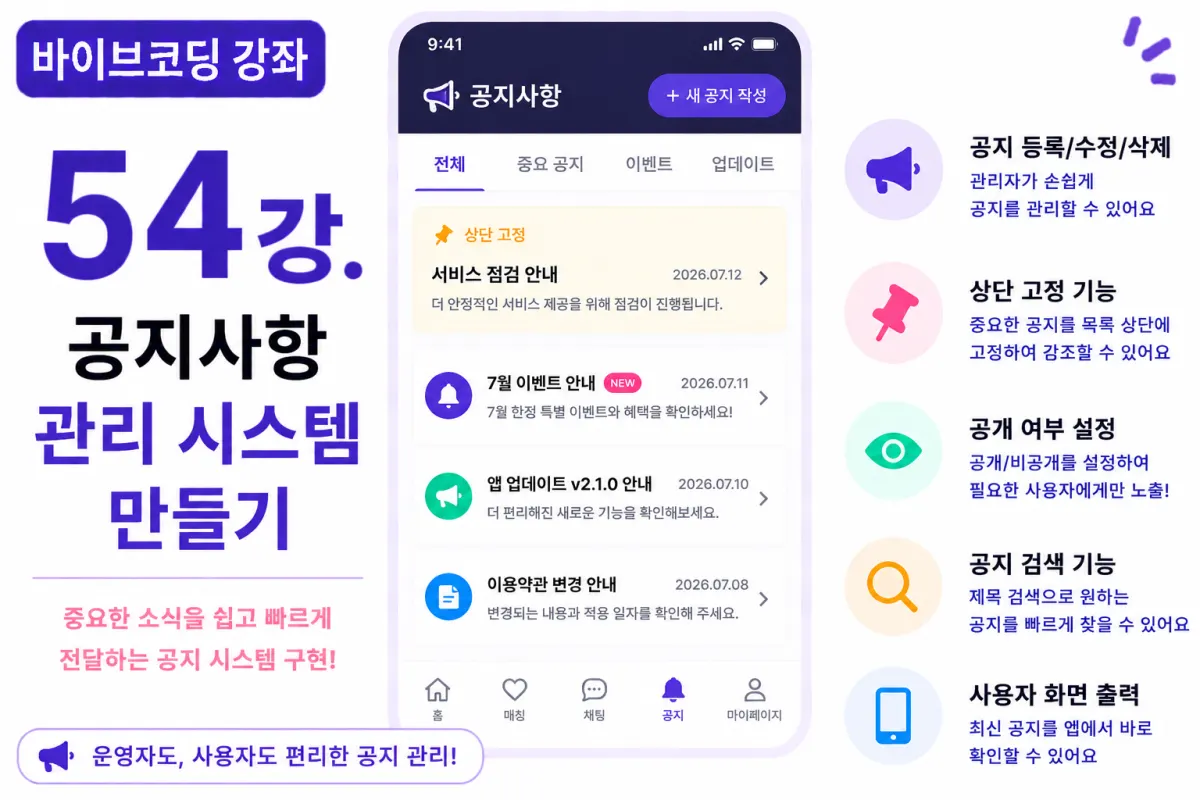
What You'll Learn in This Lesson
Last week, we implemented the Admin dashboard.
Now administrators can manage members and services.
In this lesson, we'll build a crucial feature: the Notice Management System.
We'll cover these topics:
Posting notices
Editing notices
Deleting notices
Pinning to top
Setting visibility status
Displaying on user interface
By the end, administrators will be able to easily communicate important information to users.
Why Notices Are Important
When running a service, you'll frequently need to inform users about:
Scheduled maintenance
Updates and new features
Events and promotions
Policy changes
Notices serve as a vital communication channel between administrators and users.
Database Design
Notices are managed in a separate database table, for example:
notices
The basic columns include:
Title
Content
Author
Visibility status
Pinned status
Creation date
Last modified date
Requesting Help from Cursor AI
First, we request from Cursor AI:
Implement notice CRUD functionality using Next.js and Supabase.

Restrict posting, editing, and deleting to administrators only.
The AI generates both the UI and API for these features.
Notice Posting Interface
Administrators can create new notices by entering a title and content. Using Toast UI Editor allows easy creation of notices containing images and links.
Visibility Settings
Not all notices need to be immediately visible. Administrators can choose between:
Public

Private
Private notices won't appear on the user interface.
Pinning Functionality
Important notices should always appear at the top of the list. For example, maintenance announcements or event information benefit from this feature.
Editing Notices
Existing notices can be edited anytime. Saving the last modified timestamp makes it easier to track operational history.
Deleting Notices
Unnecessary notices can be deleted. In practice, most systems use Soft Delete rather than permanent deletion, allowing for potential recovery if needed.
User Interface Display
Regular users can view the latest notices. Pinned notices will always appear first, followed by notices in chronological order of creation.
Notice Detail View
Clicking a notice title shows detailed content. Long notices are formatted with appropriate spacing and image sizing for better readability.
Search Functionality
As the number of notices grows, implement search by title so both administrators and users can quickly find relevant information.
Improving with Cursor AI
After completing features, request from Cursor AI:
Improve the notice management system's appearance and functionality.
The AI may suggest improvements such as:
Enhanced list UI
Improved search capabilities
Mobile-friendly design
Permission Management
Only administrators can create and edit notices. Regular users can only view them. API endpoints must also verify permissions.
Performance Optimization
To improve speed, the notice list doesn't load full content. Instead, it shows titles, dates, and pin status. Full content is loaded on detail pages.
Testing Procedure
Test in this order:
Admin login
Create notice
Edit notice
Verify pinning
Check user interface display
Verify deletion
If all steps work correctly, the notice management system is complete.
GitHub Commit
After completion, ask Cursor AI:
Create a commit message for the notice management system implementation.
Maintain the habit of committing changes in functional units.
Additional Features in Production
In actual services, these additional features are often implemented:
Scheduled posting
File attachments
View counts
Popup notices
Urgent notices
This project focuses on implementing the core notice features only.
Your Management System Is Now Complete
By completing this lesson, administrators can directly create important notices, and users can easily view the latest information. This adds a critical feature required for actual service operations.
Next Lesson Preview
In the next lesson, we'll implement settings management functionality including:
Service name, logo, registration policies, and terms of service that administrators can modify.
Conclusion
We've built a notice management system in this lesson. By implementing posting, editing, deleting, pinning, and user-facing display features, we completed an important communication channel between administrators and users.
In the next lesson, we'll enhance the management system by adding service configuration functionality.
FAQ
What is a notice management system?
A notice management system allows administrators to create, edit, and manage important announcements that users can view on the website.
Why use soft delete instead of permanent deletion?
Soft delete preserves records for potential recovery if needed, which is common practice in production systems.
Korean Source
This article is an English localization of a Korean-language report from BlogScore. Original: [바이브코딩 강좌] 54강. 공지사항(Notice) 관리 시스템 만들기