
Building a Database for Your Dating App: A Step-by-Step Guide
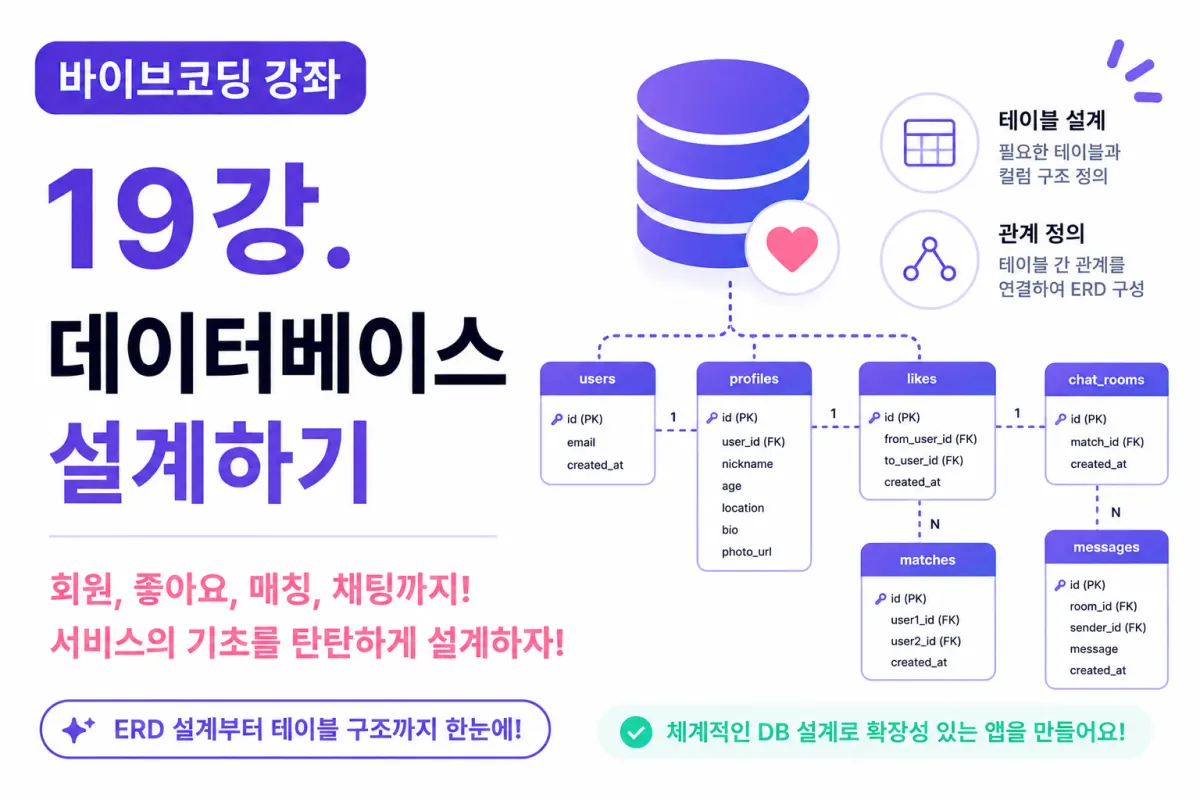
What You'll Learn in This Lesson
Last week, we designed the user interface (UI) of our dating app.
The screens are now ready to be seen by users.
But a UI alone isn't enough for a functioning service.
We need a place to store information like user profiles, likes, chat history, and more.
This is where the database (Database) comes in.
In this lesson, we'll cover:
Defining necessary tables
Setting up relationships between tables
Designing columns
Understanding ERD concepts
Using Cursor AI to assist with the design
We'll work through these together.
Why Database Design Matters
Just as a strong foundation is crucial for building a house, proper database design is essential for developing a service.
If the initial design is flawed,
Adding new features becomes difficult
Performance slows down
Maintenance becomes challenging
On the flip side, a well-structured database from the start allows for easier addition of new features later.
Data Needed for This Project
A dating app requires storing various types of data.
For example:
User information
Profile details
Interests
Likes history
Match information
Chat content
Notifications
Each of these data types should be managed in separate tables for clarity and ease of management.
What Is a Table?
A table (Table) is a storage space for similar types of data.
For instance:
User information would be stored in the
users
table.
Profile details would go into the
profiles
table.
Chat content would be stored in the
messages
table.
Separating data by function makes management much easier.
The users Table
First, we need to store user information.
The users table will hold:
id
email
created_at
We'll use Supabase Auth for authentication, so core login-related data is linked to the Auth system.
The profiles Table
User information and profile details are stored separately.
For example:
Nickname
Gender
Age
Location
Bio
Profile picture
Storing profiles separately from user accounts makes management and future expansion simpler.
The likes Table
This table handles the "like" feature.
It needs to store:
User who sent the like
User who received the like
Time of the like
For example, if User A likes User B, a single entry is added to the likes table.
The matches Table
When two users like each other, a match is created.
This information is stored in the matches table.
For example:
User A
User B
Match time
These details are recorded here.
The chat_rooms Table
After a match is confirmed, a chat room is created.
Each chat room needs a unique ID.
The chat_rooms table stores:
Room ID
Participants
Creation time
This helps organize conversations between matched users.
The messages Table
Actual chat content is stored in the messages table.
For example:
Chat room ID
Sender
Message text
Sent time
This is one of the tables that will accumulate the most data over time.
The notifications Table
This table stores information for sending notifications to users.
For example:
New like received
Match completed
New message received
This can later connect with push notification features.
Understanding Relationships Between Tables
Relationships between tables are crucial in a database.
For example:
A single user has one profile.
This means users and profiles have a one-to-one (1:1) relationship.
On the other hand,
A single user can send multiple messages.
This means users and messages have a one-to-many (1:N) relationship.
What Is an ERD?
An ERD (Entity Relationship Diagram) visually represents relationships between tables.
For example:
users
   │
   ├──── profiles
   │
   ├──── likes
   │
   ├──── matches
   │
   └──── messages
Drawing this structure first makes it easier to understand the overall service architecture.
Designing with Cursor AI
We'll now ask Cursor AI for help with our design:
"Design the ERD for a dating app."
The AI will suggest:
Necessary tables
Relationships between them
Primary keys
Foreign keys
This helps streamline the design process.
Example Good Prompt
For instance, you could ask:
Using Supabase PostgreSQL.

A dating app with sign-up, profile, likes,
matches, and chat features.

Design the necessary tables and ERD structure.
This prompt helps AI consider the entire project when generating a design.
Avoid Overcomplicating Columns
One common mistake among beginner developers is trying to store all possible information from day one.
For example:
Blood type
20 hobbies
Social media links
MBTI type
Height
Weight
However, for an MVP (Minimum Viable Product), it's better to store only essential information.
You can always add more columns later once the core features stabilize.
Designing with Scalability in Mind
This project is educational, but we'll design it as if for a real service.
Therefore, our structure will be simple yet scalable, allowing for:
New features to be added later
Pricing systems
AI recommendations
Premium memberships
To be implemented without major rework.
Data Structure Complete!
We've now completed:
Service planning
UI design
Database design
All the necessary groundwork for actual development is done.
In the next lesson, we'll move to creating real tables with AI assistance.
Next Lesson Preview
The following lesson will use Cursor AI and Supabase MCP to create actual database tables.
We'll practice generating SQL code with AI, creating tables in Supabase, and seeing how our design translates into a real database structure.
Wrapping Up
A well-designed database is the foundation of a great service.
In this lesson, we defined the necessary tables for a dating app, designed their relationships, and created a data structure that closely resembles what you'd build for a real-world application.
The design phase is now complete.
Starting in the next lesson, we'll use AI to execute SQL commands and bring our design to life as a real database.
FAQ
Why is database design important?
Poor initial database design can lead to difficulties adding features, slow performance, and hard maintenance. A well-planned structure makes future development easier.
What is an ERD?
ERD (Entity Relationship Diagram) visually shows how different tables in a database relate to each other, helping developers understand the overall data structure.
Korean Source
This article is an English localization of a Korean-language report from BlogScore. Original: [바이브코딩 강좌] 19강. 데이터베이스 설계하기