
Boost Your SEO with Smart Internal Linking Strategies!


Boost Your SEO with Smart Internal Linking Strategies!
So far, we've covered SEO writing techniques, image optimization, and how to get your content indexed quickly by Google.
This time, let's discuss an often-overlooked but crucial SEO element: internal linking.
Writing great content is important, but even more critical is creating a path that encourages visitors to explore other posts on your site.
This is the essence of internal linking strategy.
What Is Internal Linking?
Internal links are hyperlinks connecting different pages within your own website.
For example, when a visitor reads this post, you might suggest related articles like:
What is SEO?
How to find keywords
Writing search-friendly titles
All of these links connect pages within your site, which is why they're called internal links.
Why Internal Linking Matters
Search engines use internal links to understand your site structure.
Visitors follow internal links to read more related content on your site.
In short, internal linking benefits both search engines and visitors.
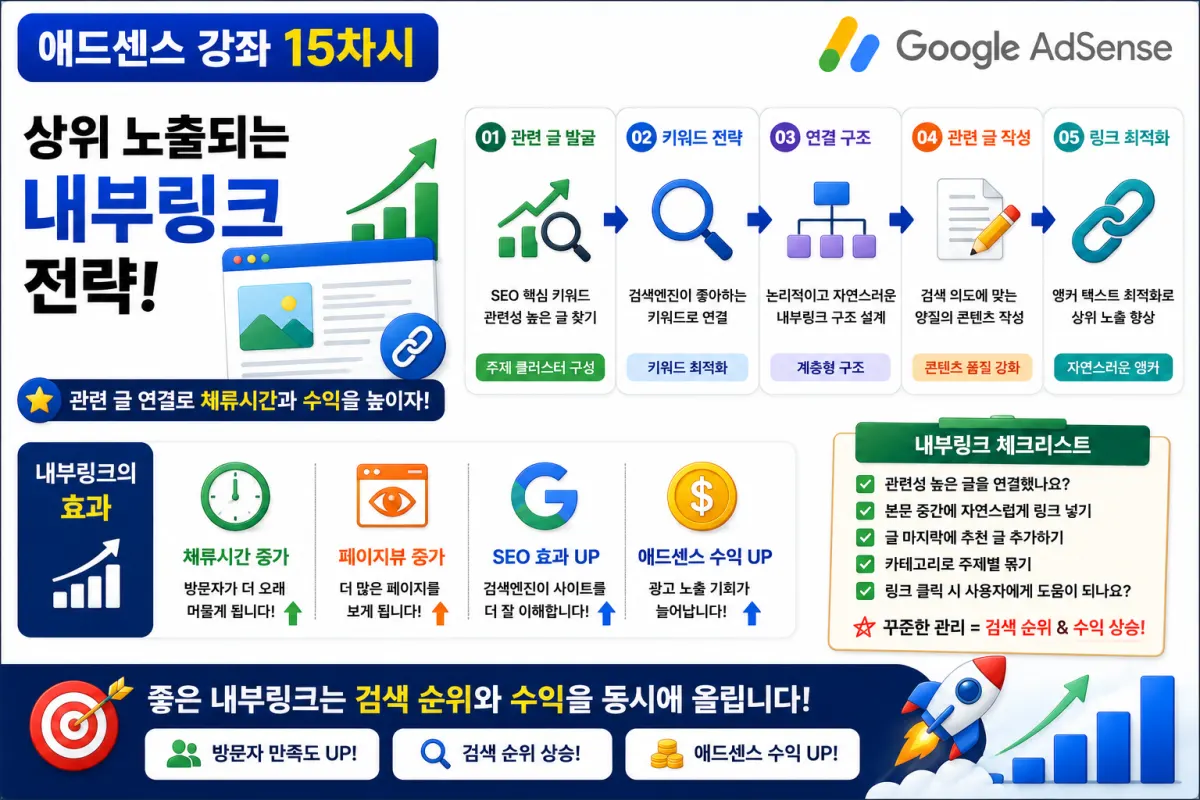
Increased Dwell Time
For instance, if a visitor reads just one post and leaves, their time on site will be short.
However, if they click through to related articles and read five posts, they'll spend much more time on your site.
This kind of user behavior can improve perceived site quality.
Higher Page Views
If one visitor reads only one page, your page views count is 1.
But if they keep reading related articles, the page view count could rise to 3, 5, or even 10.
This increase in page views can benefit AdSense revenue by providing more ad impression opportunities.
Which Articles Should You Link To?
Making too many links doesn't necessarily improve your SEO.
You should link to relevant articles that naturally connect with the current topic.
For example, if this is a series on SEO, good related posts might include:
What is SEO?
How to find keywords
Title writing techniques
SEO content structure
Irrelevant links will not get clicks from visitors.
Naturally Incorporate Links Within Your Content
The best approach is to introduce related articles naturally while readers are engaged with your content.
For example, "If you're curious about keyword research, check out our previous guide first." This keeps the visitor's flow uninterrupted.
Recommend Related Articles at the End
This is a common practice across many websites.
After your main content ends, present "Recommended Reading" with 3-5 related articles.
This makes it easy for visitors to choose what to read next.
Categories Are Also Internal Links
Categories function as a type of internal linking structure.
For example, grouping posts under categories like:
SEO
AdSense
WordPress
ChatGPT
Makes it easier for visitors to find what they need and helps search engines understand your site structure.
Avoid Overloading with Links
Too many links on a single page can reduce focus.
It's better to link only to truly relevant articles.
Typically, 2-5 natural links within the main content and 3-5 recommendations at the end work well.
Use Popular Articles as Well
Displaying popular posts, recent posts, or recommended articles in sidebars or footers can increase the chance visitors will read more content.
This strategy is particularly effective for AdSense sites.
Common Mistakes Beginners Make
Here are common errors to avoid:
Not using internal links at all
Linking to irrelevant articles
Adding too many links
Ignoring older posts
No recommended content
Addressing these issues can significantly improve your site's quality.
Internal Linking Checklist
Before publishing, check:
Are relevant articles linked?
Is there a recommended reading section at the end?
Are categories well organized?
Are popular posts displayed?
Do links work properly?
Are irrelevant links removed?
Using this checklist as a habit can help you build a site structure that supports better SEO.
Internal Linking: The Map That Connects Your Site
Search engines follow internal links to explore your site.
Visitors discover new information through these connections.
Good internal linking creates a cohesive experience where individual posts feel like part of a larger content ecosystem.
Think of it as a strategy that elevates the value of your entire site, not just single posts.
Conclusion
Internal linking isn't complicated—it's about connecting relevant articles naturally and helping visitors find their next read easily.
This simple approach improves both SEO performance and user experience.
When great content meets smart internal linking, search engines understand your site better, and visitors stay longer.
In our next guide, we'll explore common SEO mistakes to avoid, including keyword stuffing, copied content, and low-quality posts that can negatively impact search rankings.
FAQ
What is the ideal number of internal links per page?
Typically, 2-5 natural links within the main content and 3-5 recommendations at the end work well without overwhelming readers.
Why should I avoid linking to irrelevant articles?
Irrelevant links don't get clicked by visitors and can harm both user experience and SEO performance.
Korean Source
This article is an English localization of a Korean-language report from BlogScore. Original: [15차시-실전편] 상위 노출되는 내부링크 전략! 관련 글 연결만 잘해도 SEO가 달라진다